Using the SF_SigmafineBalance Table
The SF_SigmafineBalance table contains the analysis rule settings, which includes the unit of measure to be used as the balance quantity, as well as the Attribute defaults for the balance parameters.
Note: Table editing is not available in the Modeler.
To edit the SF_SigmafineBalance table:
Open System Explorer.
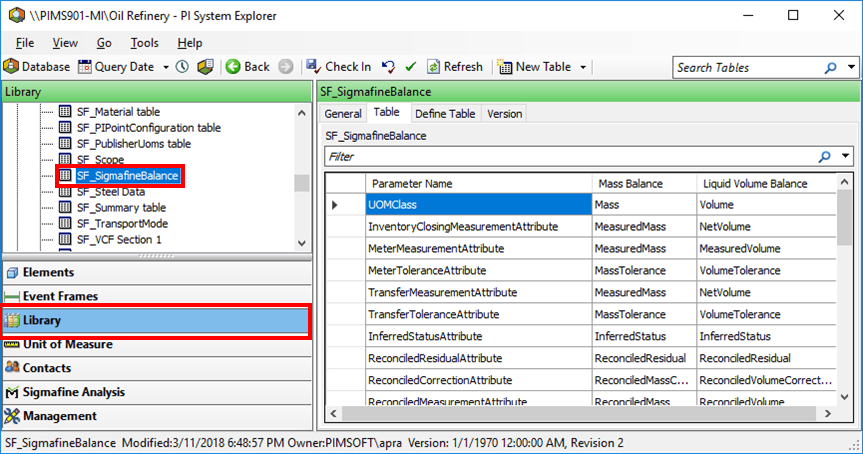
In the navigation pane, click on Library.
Select the SF_SigmafineBalance table (as shown in Figure 250).
To create a new basis for the Sigmafine Balance Analysis Rule, you must add an additional column to the table.
To add the column:
Click the Define Table tab.
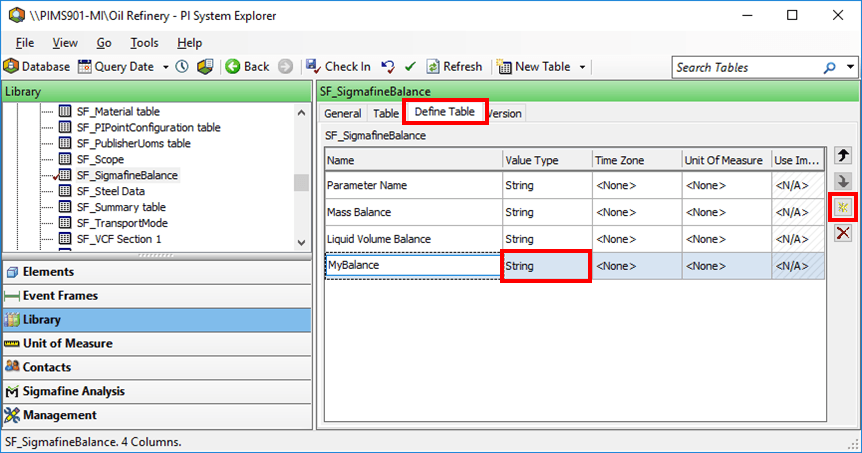
Click on the
 Add button.
Add a column with the Value Type of String (as shown in Figure 251).
After you have added the new column, click the Table tab.
Enter the values according to the guidelines listed in the following table.
SF_SigmafineBalance Table Guidelines
Parameter Name Guideline UOM Class REQUIRED: Enter the unit-of-measure class for the balance. This needs to be a valid UOM class name that exists in the UOM database. Also, all Attributes selected in the configuration that are used for the balance must follow this UOM class. *Attribute OPTIONAL: All Parameters with the suffix “Attribute” select the default Attribute name that appears in the configuration dialog. *Category OPTIONAL: All parameters with the suffix “Category” name the Element category associated with that Element type.